Showing posts with label Tech Support. Show all posts

Tuesday, May 10, 2011

Samsung Transform Phone Update: Trouble in Paradise

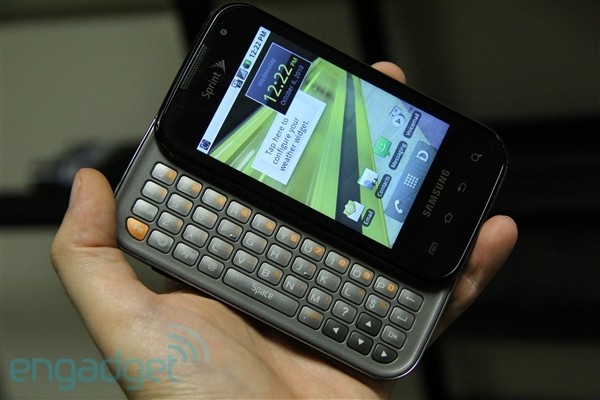
Image of Sprint Samsung Transform from Engadget
So, I'm loving my new phone. I spent all weekend with The Other Half and friends up at Mt. Charleston, and since it was the only internet (or media of any kind) accessible, I got to know my Samsung Transform. I got to know its slide-out and its on-screen QWERTY keyboards. I discovered the cute little emoticon button, and the dedicated ".com" button. Pretty nifty. I discovered Angry Birds, and downloaded soundboards for The Simpsons, Pee Wee Herman, Family Guy and. . .farts. I discovered that the battery runs down fairly quickly if going all media-using. I tried my hand at mobile blogging, but with no news source other than the phone, I wasn't very motivated to blog.

Overall, I'm really digging it. I thought that buying something other than an iPhone would feel "less than," like every other phone I've had. But right next to my friend's Apple product, mine measured up pretty well. Plus, I get the keyboard! The Android Marketplace is extremely easy to use, and there are copious apps available. There are things to get used to, like sliding an on-screen button across the screen to answer or hang up the phone. It is a little too easy to accidentally dial somebody if you're editing your contacts, and a little too difficult to hang up in a panic. The connection strength and speed of operation is as vulnerable as any other phone, though I've got to say, the ability to effortlessly join a mobile network really helps with the speed issue. The sound quality is great, though to be honest, talking on the phone has been the thing I've done least so far. And already I've had one dropped call. Oops.

My test sample is too small to know if that dropped call is an indicator of anything yet. But I did have a minor issue with major ramifications. When we dumped The Other Half's phonebook into my new phone (my old phone having drowned in the washing machine), his cell phone number retained its original formatting from three phones ago. It only ever had seven digits, with no area code. So, the first time I texted him, it bounced back with an error saying that it needed a 10-digit number. Okay, no big deal. I just went into the phone book, and added the 702. Voila! Or not. Every text to him--unless I typed all 10 digits each time--bounced back with the same error.

So, I tried editing the entry. I tried deleting and reentering the entry. I tried searching the Googles for a cure. I called Sprint customer service. No dice. It was the same issue, no matter what I tried. Ultimately, I took my new phone, and TOH's old phone to the Sprint store. After waiting for over half an hour, I was finally waited on. The sort of surly attendant (dude, you work in a Sprint store, not a Genius Bar) said I could leave the phone overnight, or he could do a hard restore, which would wipe out everything I've done to the phone, but retain my phone book. Fine with me. I can get the Angry Birds and the fart sounds back! So that's what we did. I made sure the texting worked, and left the store. I've spent most of my time since then editing my phone book (which was loaded with numbers important to TOH but not to me), and restoring some of the settings I liked.

All in all, since the issue has been resolved, I'm still pleased. Assuming there are no other glitches or hurdles to jump, I think it's going to be a decent two years. I'm sure that during that time, Apple will release iPhones 5, 6 and maybe 7. Android will have grown up to "Jujyfruit" or "Key Lime Pie" (all of their release names are desserts), and who knows, Sprint may have been absorbed by another corporate merger.  And cell phones themselves may have made another quantum leap that makes this phone look like a klunky antique.

Monday, July 30, 2007

Technical Difficulties: Another Update

If there is a downturn in posting at Greenlee Gazette this week, please don't take that to indicate a loss of interest in the blog. We're still experiencing outages in our broadband service today. After my fifth trip through the automated queue at COX, I have a technician scheduled for a Friday visit.

Hopefully, my sporadic outages will be during the day, while I'm at work. It's holding on right now, so I'm crossing my fingers. Please stand by.

Saturday, July 28, 2007

My Day: Broadband Nightmare


Oh, my brain. I started this day with the intention of getting a few blog posts up, maybe some housework, some reading, maybe a nap. But oh, no.

I've had several internet interruptions over the last day or so, and finally, it wouldn't come on at all. So, I called my friendly neighborhood COX technician. Now, I have nothing but nice things to say about their service, as they are unfailingly polite and helpful. After negotiating their (rather amazing) robotic help menus, I finally needed to talk to a human. That human informed me that my modem had reset itself something like 200 times, and then gave up the ghost shortly after noon. She suggested I buy a new cable modem, and actually suggested I save some money by buying my own at the store. I thought that was good advice, as I paid $100 for the last one from the cable company. Big mistake.

I quickly found a modem at Wal-Mart (Sam's didn't have it, Fry's is a nightmare, and Best Buy is miles away). $65 after tax, and I was out the door. It was virtually identical to the old modem, so I just switched out the plugs, and turned it on. Of course, it wasn't that simple, so another COX tech (after wading through the compu-bot menus) helped me get it running, but only directly, and not through my router. After hanging up, I turned on the router, and nothing worked. Another call to COX, another conversation with the android.

When I finally got a technician, he turned out to be the only COX person I've ever talked to who was not courteous, not helpful, and terrible on the phone. He would not, could not help me with my router. So, I called D-Link, and they would only help me if I paid them. And my router was obsolete and unsupported.

Back to Wal-Mart to purchase a router. Another $65 after tax, and I was on my way. The instructions tell you not to load the CD until you hook up the router, but not to hook up the router until you load the CD. My brain is burning. Anyway, I figured it out, ran the install, and it first would not detect anything. After powering everything down and back up, I got it to go all the way through the install routine, but it could not detect the internet. So, I called up Belkin, and got the friendliest and most unintelligible man in India tell me it was COX's fault.

Back to COX, back through the menu. We finally determined that the splitter that splits the coaxial cable to the TV had burned out. What an amazing (and slightly unbelievable) coincidence. I refuse to hook up the old modem to see if it was actually OK, and the $2.99 splitter was the problem all along. I'd like to think not, and I'm pretty sure it isn't the case, since the new modem worked fine earlier, when it was first hooked up.

Anyway, everything is now working (after 6 hours), and running much faster, so I'm leaving it all the hell alone. And I'm not doing the dishes or any other chores now. I've worked hard enough today.

Related Posts Plugin for WordPress, Blogger...