Showing posts with label New Technolgoy. Show all posts

Wednesday, August 14, 2013

Computer Woes Banished!!! . . . (Or Are They?)

It wasn't quite this bad.
[EDITOR'S NOTE: This is computer geek stuff, if you have no interest in that, please scroll on by!]

Ever since I bought my iomega cloud external hard drive, it's been trouble. For one thing, they make you send an email to whatever computer you're going to need access from, and then install their connectivity software on it. Their clunky connectivity software. My aim with this system was to integrate my work experience between home and work. Sometimes I need my work files when I'm home, sometimes I need my home files when I'm at work.

I discovered quite by accident that the Western Digital MyBook Live drive we have at work was itself a cloud drive, but it's come in handy a couple of times. It's very slow, but it always works. So, when I purchased the iomega, it was in the aim of getting pretty much the same thing. It's not. The drive never worked very well, though it usually worked from my desktop computer at home. Remote access was tenuous at best, and nonexistent at worst. I struggled with it for about a year. But when I got my new Windows 8 computer, its faults and glitches became intolerable.

The iomega Home Media cloud drive.
Stay away. By the way, they're Lenovo
now, so don't be fooled!
Problem was, I couldn't be sure that it was the drive that was the main problem. My HP Pavilion 500-037c system came with both Ethernet and wireless connections, and initially, I just hooked up the wireless. Things went swimmingly at first. I installed all my software, hooked up the drive, got everything going, even mapped the shared folders on the iomega. I also upgraded to Windows 8.1, which--if you're wondering--is a much needed improvement over Windows 8. Everything seemed fine, though truth be told, I wasn't up and running for very long before I ran into a small issue.


The new WD drive. So far, it's
better and faster. I will update
if things change. By the way,
it even will link to your
phone or tablet!
In AOL, which I by (18-year) habit use as my main email reader and for some other things, I found that the emails weren't displaying their headers, as in no information about the sender, time, date, or anything. When trying to remedy this situation, I tried the third or fourth solution I found online, which was uninstalling and reinstalling the software. The AOL uninstaller has three components, including a virtual internet adapter (who knows why). Removing that element seemed to be a mistake, though I really can't be sure now.

Anyway, upon restarting, I found that I had no internet connection. More than that, there weren't even any networks listed, where there is usually mine and several others from my neighborhood. After futzing around for a while, it became clear that I'd need to plug into the router with a Cat-5 cable, and even that didn't work without more tweaking. Eventually, I got on through the wire, but had lost the iomega cloud drive! After being frustrated nearly to tears, and having attempted Windows Restore three times, only to be told it failed, I said "screw this" and told Windows to refresh back to its original state. I knew this would mean reinstalling all the software, but supposedly keep my files (which it didn't, glad I had backups).

This seemed to work for just a little while. The iomega drive became much more problematic, only being accessible through Windows Explorer, and then not all the time. The wireless internet came back briefly, and then was gone. I got out a little USB wireless adapter from an old computer, and even that was unstable. And maddeningly, frustratingly, the iomega would only connect while there was a live wireless connection. Otherwise, it would refuse to connect. My MacBook Pro could see the drive through the network (even though it has never been able to connect remotely), but that was it. As I said, it has always been trouble, and I was sort of at the end of my rope with computer troubles. When it wouldn't connect at all from work the other day, I decided I'd had enough.

There's a Fry's Electronics on my way home from work, and I resolved on Monday to buy a new drive on my way home. I figured, hey, even if it doesn't solve all of my problems, it will at least solve some of them. On Fry's very long aisle of external drives, I found WD's MyBook series in a variety of flavors, and compared a few. Lucky for me, I realized that none of them were cloud drives, and moved on down to the end. HAZAH! MyBook Lives were at the end of the row, and no more expensive than the non-cloud versions. Before buying, I told the sales rep my issue, asked what he would buy, and he picked up the one I'd already thought I'd buy. $119 later (same price as my iomega, and 2 terabytes instead of 1), and I had it.

If you're still with me, hey, how ya doin'!  You'll be surprised to know that my iomega stayed active long enough for me to copy its contents onto the new drive. And I was surprised to find that Western Digital has simplified their software to the point of ridiculous ease. And I don't need to install it on the remote computers! I just send an email from my home computer, open it in any browser on any computer, log in and VOILA! The only catch is that it uses Java, which requires irritating updates almost as often as Adobe Reader.

Even better, after I uninstalled the iomega software, and reinstalled my computer's network drivers from HP, things seem to be back to normal. Better yet, the WD drive does not require the wireless adapter to work (it made no sense that the iomega did, but there you go). I am by no means ready to declare victory. The wireless may flake out on me again. But at this point? The router is right next to the computer anyway, and if I can see my files all the time, the wireless really doesn't matter very much. If it flakes again, it will gnaw at my computer guru psyche, but that's all.

But after all of this? The AOL mail headers still don't display. Ain't that a bitch?

UPDATE: Well, the wireless is out again, so it either had nothing to do with the iomega, or maybe it does. . .and there's some kind of crap left over causing issues. But the good news is the drive still works just fine. The bad news is, I'll be on the phone all day on Friday with HP trying to fix the damned thing (or it will drive me crazy).

Sunday, March 24, 2013

The Mac Experiment, Continued: The Cult of Mac is Trying to Convert Me. . .

No, nobody knocked on my door. They didn't stick a pamphlet in my door, or hang a tract on my gate. But the Apple Cult is working its magic on me. It's a slow creep, and it's taken 2-1/2 years, but I have to say, I'm at least partially in their thrall this week.

Last week was a different story--as I related here at the time--when my second (admittedly used) Macintosh laptop experienced a useability problem. My first try at the iUniverse was a PowerBook G4 that was insufferably and unusably slow. My second was a decent MacBook Pro (first generation), that had a video card meltdown. I was essentially the victim of an unrealized, and too late recall. And so, my little experiment in dabbling in the OS X side of things--while keeping my PC/Windows 7 main system--had experienced its second major roadblock.

Noooooooooooo!
The first time, I got my used Mac at 5+ years old, and for $300. The second time, I sold the old (plus some other computer equipment), and paid $650ish for an almost 4 year old system, almost breaking even overall price-wise. The third time, I was faced with a $550 repair, and instead bought a third Mac in less than 3 years for $860. This one is 3-3/4 years old refurb, and when you do the math of what it would have cost to fix the old one, plus the $200 I sold the broken one for, I actually came close to breaking even again, and got a newer/better computer.

How much better? Oh-so-much better! I didn't know what I did not know, to paraphrase Donald Rumsfeld. While my first-gen MacBook Pro was plenty useable before its "little problem," it wasn't a) as pretty as this newer one, nor b) as all-around better. I love the keyboard. I love the screen. I love the way the aluminum case looks. It is faster at almost everything. Setting it up right out of the box--and I'm a PC guy used to tweaking and fiddling for hours--was nearly effortless. Though I'm only moderately familiar with where and how to set up Mac stuff, I got all of my info entered and done within minutes. But that's not all.

My software isn't this obscure, but it seems
as unlikely to work on a Mac.
This system came with "Parallels" and Windows 7 installed and ready to go. I use a particular kind of software for my sign graphics business that is PC only. It couldn't possibly work on my Mac, right? Not even with emulation software. Wrong! It runs, and runs perfectly. I was able to copy all of my system files to a USB thumb drive, copy them over and set them up in no time. I was only hindered by the download time for the software, and that was only because I didn't feel like moving from one end of the house to the end my wireless router is in.

Next, I went back to my PC, to get my (very cumbersome, very unintuitive) iOmega Cloud Drive to communicate with the Mac. This is not a PC problem but an iOmega problem (which is now apparently Lenovo EMC's problem, since they've changed hands). Still, once I got the info sent to the Mac, it was smooth sailing. Bada-bing, bada-boom. And the icing on the cake? When I went to set up the MacBook Pro to my wireless all-in-one Lexmark printer? No joke, done in 10 seconds flat.

So now--as long as I'm thinking ahead and take the special USB fob my graphics software needs--I can travel with my MacBook Pro to anywhere in the world, access my files from my home cloud drive, and through Windows 7 work on any of my projects for either of my jobs! I'll never be free from work again! Yay?

Okay, I don't love my Mac this much. . .
Bottom line, this was the easiest setup of any computer ever in my career as "guru." How long until I'm as proficient on the Mac side as I am on the PC side? Soon, I hope. But it's the hardware side that worries me. While it's fair to say that all laptops are a challenge if something goes wrong with the hardware, I'm finding that Macs don't age particularly gracefully, and that Apple kind of washes their hands of them at a fairly young age (the hipster "genius" with the lensless glasses at the Apple Store barely disguised his contempt for my 5-year-old ailing Mac).  So it's not all unicorns and rainbows. Still, I'm impressed, and I have a smile on my face when I use my new(ish) Mac!

Saturday, November 19, 2011

Computer Woes: A PC Bites the Dust

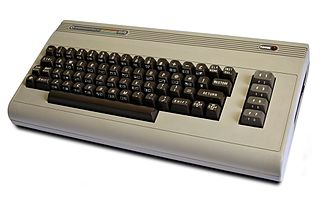
My first computer. Wherever it is, it
probably still works.
I've had nine personal computers, from a Commodore 64 in 1982, to a 386DX off-brand, a Packard Bell Pentium I, a Sony Vaio Pentium III, a Hewlett-Packard Pentium 4, a Dell Pentium 4HT, an HP Core 2 Duo, and two laptops, a Dell Celeron and an Apple PowerMac G4 15 (which I'm using now).

And I'm probably going to have to get my 10th tomorrow. My Core 2 Duo machine promptly died today, while I was away from my desk. No snap, crackle or pop. No poof, or puff of smoke. It just wasn't showing a picture anymore, and the keyboard didn't work.

My doorstop dead computer.
Nothing I've tried helps, and The Geek Squad, via telephone, thinks it's the Motherboard. So, I'm rightly pissed that my HP didn't quite make it to three years of service, and will probably be more efficient to replace than to repair.

The long and short of it is, along with social obligations, I'm going to be very busy for the rest of the weekend, and likely won't be posting much.

Incidentally, not counting the dead one, we have four computers in the house (The Other Half's desktop, my Mac notebook, the unused Celeron, and the "spare" HP Pentium 4 in the closet). All are older--some by a lot--but all are functional. The one in the worst state of repair? The other Hewlett-Packard.
Related Posts Plugin for WordPress, Blogger...