Showing posts with label Computers. Show all posts

Tuesday, September 2, 2014

Blast from the Past: Old Timey Computering!

I'm still ensconced in a network-wide malware infestation, that somehow manages to span two PCs, a MacBook Pro and at least one of our two Android phones. It seems to have started immediately after a party on Saturday, and I can't explain it. I've had no success in eradicating it yet. But while I work on it, I can think back to a simpler time. A time when computing was relatively virus- and malware-free. Come back with me, won't you?

1. CompuServe - This was an early online service, one that catered to the more professional set. It was kind of absorbed by AOL.

2. America Online -  Technically still around as AOL (and yes, I still use it), it was originally a more user-centered online service that had no internet access. But it had lots of people hooking up on their message boards!


3. Prodigy - One of the granddaddies of the online experience, Prodigy was about the best thing going for a little while. AOL and the advent of the World Wide Web pretty much killed them off.

4. Atari 400 Computer - One of the earliest computers for ordinary consumers, this one tried to parlay the very popular VCS 2600 video game system into computing success. It didn't ever get very poplar.


5. Commodore Vic20 - Even earlier than the Atari, this one paved the way for the much more successful. . .

6. Commodore 64 - This one was probably the most popular computer to predate Windows and Apple systems. They ran with this one long after it had been surpassed by more advanced computers.


7. Apple II - Apple may have always been behind PCs on the business front, but they always lead the way in schools, where the Apple II ruled. Still, they tried to market it as a home computer.

8. WebTV - Too far ahead of its time to be workable, what it set out to do is now done by other devices.


And while malicious code writers weren't as prevalent back in those days, I really wouldn't want to go back to them, would you? I'll sort these problems out, and undoubtedly encounter new ones. But one day, the devices we're using now will seem as quaint and simple as the ones in these ads.

For now, have a great (short) week. Happy Tuesday!

Monday, September 1, 2014

Behind the Blogger: A Malware Infestation at Greenlee Gazette

I'm a computer guru. I'm not professionally trained, but I'm naturally inclined toward tweaking and poking around in computer settings and whatnot. I'm "that guy" you call when your computer is doing weird things or is on the fritz. 99% of the time, I can either fix it, or tell you what to do to fix it. I've been using Windows computers since they were MS-DOS computers. But what does the guru do when he's got a problem?

Every so often, even I get a problem. I can get complacent, trust something I ought not, accidentally clicked the wrong thing, or even have gotten suckered by a warning that looked real, but wasn't. Usually, I realize my error quickly, and reverse course. I know a lot of the tricks of the trade to restore things to normal without too much fuss.

Two things have plagued me that have no known source of infection, and one even happened both at home and at work. That first one was a very strange audio anomaly. Commercials would play over the speakers with no program running them. They would be both in English and in foreign languages, and they would eventually pile one on top of the other until it was an unintelligible cacophony. I could isolate the audio on my mixer settings and silence them, but eventually all of the processing power would be leached away. It was maddening. But, after running the proper tools (Malwarebytes), using the Googles to isolate the proper files in the registry, and slogging through the guts of the computer, I killed the problem. And again at home.

I still don't know what it was, or how I got it. And to be truthful, I'm not sure what the final thing was that worked. Funny how that goes, you try so many things, you can't remember the sequence. Anyway, though I slayed that beast, there is a new one plaguing me the last two days.

First, I should explain that I run dual monitors, and I am usually running Internet Explorer 11, Firefox and AOL at the same time (AOL?!? Yeah, I know. Shut up, it's how I work, okay?). And this new demon affects both AOL--and get this--FIREFOX. Not IE. It's working just fine. No, this one is throwing up random ads from Firefox and AOL, for both bogus and real products. Sometimes it's TuneUp Utilities, a program that used to be very helpful but bloomed into a nuisance, sometimes it's WIX.com. Other times it's for very shady programs that cause the very thing I'm trying to get rid of. And sometimes, it's bogus upgrade notices for video players I don't even have, to the point of attempting to start downloads of the programs.

It's driving me bananas. I've gone through my bag of tricks. I'm using Windows 8.1, so I've got Windows Defender already. I've run Malwarebytes several times. I installed and ran Avast! I've tried SUPERAntiSpyware. All of these programs found problems and allegedly cleaned them. And the problem remains exactly the same. No change. Presently, I'm going into my old bag of tricks, a program called SpyBot Search & Destroy, something I haven't used for years. But I'm desperate! I'm really not sure what to try next. At present, this problem doesn't seem particularly dangerous, it's just incredibly annoying.

So, I'm sending this out to the universe, in the hopes someone stumbles upon it via Google or Bing. Any help will be appreciated. And also, could someone please tell me what purpose this crap serves in the first place? It's garbagy, clunky, obviously crap stuff popping up. I can't imagine it fooling a neophyte. A lot of work must go into this kind of malware. But how in the world is it worth it? If their aim is simply to torment and annoy, then mission accomplished. But if the aim is leaching money from people, they really must be trolling for dummies. Because if I wasn't a guru? I'd throw my hands up and call "that guy" to just come fix it.

UPDATED: I should also say that whatever is going on, in both AOL and Firefox, ordinary ads that appear on websites have been replaced with really ugly, very cheesy "your computer is running slow," "Microsoft certified"-type ads with blinking "click here" and "PLAY"-type buttons. We're talking 90s-style, wouldn't-fool-an-idiot ads. These are very annoying also.

Wednesday, March 12, 2014

Warning to Computer Users: Windows XP Being Put Out to Pasture

If you have an older computer, it's almost for certain that it's running Windows XP. Am I right? Maybe Vista, if your machine is really ancient, 98 or Me, but most likely, it's XP. And your frugalness is about to come to an end. Microsoft plans to stop releasing updates to the program in a few weeks, which will leave your computer vulnerable to viruses, malware and your basic nuclear annihilation.

People are already starting to stamp their feet about it. How dare they! Don't they know a huge chunk of computer users still have Windows XP? Yeah. But how long were they really supposed to support the thing? It came out in 2001 you guys. Actually, just a couple of weeks before September 11, 2001. The whole Bush administration and five years of the Obama administration have happened in that time. Were we supposed to get hip-deep into the Clinton (or, shudder, Cruze) administration before they pushed it into its grave?

The fact is, Apple stops supporting its products after just a few years. Microsoft's alone in supporting what amounts to ancient software in computer years. But I'm in the same boat. Though our home systems have Windows 7, Windows 8.1 and OSX Mavericks, at work we must have seven or eight XP machines. After the 2008 financial collapse, we didn't upgrade much. To make matters worse, our software upgrades pretty much stopped with our hardware. . .and the old stuff doesn't run well on new machines! So, we're going to (finally) have some decisions to make.

You've been warned!

[Excerpt]

Microsoft to Take Windows XP Off Life Support Despite Its 29% Market Share

Change: It’s inevitable in and of itself, and it’s inevitable that some people don’t like it. Ars Technica cites a report from Net Market Share contending that Microsoft’s almost-13-year-old operating system, Windows XP, can still be found on almost 30% of computers that connect to the Internet. . .

Read more at: Time

Tuesday, July 23, 2013

Progress Report: Computer Transition Under Way

The goal: a) Get new computer up to snuff as a blogging and graphics machine, b) Convert my old computer to The Other Half's computer, c) make sure we both have everything we want from the old machines without needlessly cluttering our new ones.

I'm at least halfway done, with each computer in its proper place (the Other Half's old one is presently set up on the coffee table until it is put to pasture). Files are partly backed up, but not moved off of the external device. And I discovered the pleasure of multi-screens!!!

One of these days. . .
But I've gotten too excited too quickly. I started with an older, non-widescreen flat panel from the closet, next to my huge 27" monitor. And it works pretty great! But that old monitor is not particularly clear, and not particularly attractive. The extended display space is really, really nifty. So, I thought, why not get the older 22" from the Other Half's old computer? Great idea. It's big, it should be just the ticket.

Unlucky me, there is no Windows 8 driver for it. And every website that purports to have one looks extra dodgy. So, I'll either rough it with the old 19" or just stick to one panel at a time until I feel I can justify the price of a second, modern monitor. But now that I have a taste? I've got to tell you, I want it!

UPDATE: It occurs to me, that since I'm blogging this to the whole world, it couldn't hurt to put the name and model of my old monitor out there, just in case there's a techie out there who has happened by. It's an Envision G22LWk. Drop me a line if anyone has an idea how to make it work. I mean, I've gotten several other, supposedly incompatible things to work!

Sunday, July 21, 2013

Upgrades at Greenlee Gazette

While I usually have less bloggng on weekends, by this time (currently 8:30ish on Sunday night), I've started getting some new stories up. So, what's the deal? Well, though I've only had my most recent desktop PC since late 2011, I went and got a new one!

See, I'm the techie in the family. And besides the blog, I have a freelance graphics business. So, even though it's The Other Half's computer (circa 2006) that is at death's door, it makes no sense to give him a brand new computer. He was really Mr. Complainy-pants about it before he left on his trip, so I decided to "start looking into" getting a new system for myself, and to hand-me-down my old one to him.

So, I hit Sam's Club, to see if there were any markdowns. There weren't. Okay, so I'll go take a look at the floor models, see what things are going for, get an idea of what I'm in for. I found a Dell (tower only) that had the bells and whistles I'd want, for $799. I looked at a couple more, some all-in-one with touchscreens (not good enough, or too pricey), a couple of budget models (Pentium chips? Really?), and then happened upon an $899 HP, with a 27" monitor. Hello, gorgeous. Nice size!

But I figured, with that big monitor, there must be a scaled down set of specs. But looky here, it's $125 off, from late June to July 21. Today. I wanted to do at least cursory study on this before plunking down my Discover card. Since I'd left my phone at home, I memorized the stock number (19. 45. 81. 19-45-81. 194581. Over and over). I looked it up at home, and was impressed. I looked up the tower-only one, and compared them. Still favorable. I decided I'd better compare the AMD chip in the one I wanted with the others Intel i5. It was a little less powerful, but only a teeny bit. And there was that 27" monitor! Back to the store I went, and now I'm typing this blog post on it.

But I'm far from done. I presently have the new one set up next to the old one. I've got The Other Half's computer backing up to the external drive. I've got my old one backing up. I've started converting my old one to his new one. And I'm putting everything I need on the new computer. Let me tell you, it's a lot of work! So, blogging tonight may be reduced, or non-existent while I finish up.

Wednesday, July 10, 2013

Florida Accidentally Bans Computers and Smartphones

God damn it, this guy's creepy.
Image from source, Raw Story.
People often lament that even laws that might be good ideas, are usually taken too far. Abortion foes can't stop at banning post-20-week abortions, they have to shut down almost all of the clinics with "trap" laws, and mandate unnecessary trans-vaginal probes. Attempts to fight obesity end up being silly, by banning certain sizes of beverages. There are many examples like that, from serious to frivolous. But lawmakers--who are supposed to be experts at this--just keep going to far, or just being lazy with their language while enacting the law with zeal.

This time, it's downright embarrassing.

[Excerpt]

Florida Accidentally Banned All Computers, Smart Phones In The State Through Internet Cafe Ban: Lawsuit 

When Florida lawmakers recently voted to ban all Internet cafes, they worded the bill so poorly that they effectively outlawed every computer in the state, according to a recent lawsuit. . . 

Read more at: The Raw Story

Sunday, March 24, 2013

The Mac Experiment, Continued: The Cult of Mac is Trying to Convert Me. . .

No, nobody knocked on my door. They didn't stick a pamphlet in my door, or hang a tract on my gate. But the Apple Cult is working its magic on me. It's a slow creep, and it's taken 2-1/2 years, but I have to say, I'm at least partially in their thrall this week.

Last week was a different story--as I related here at the time--when my second (admittedly used) Macintosh laptop experienced a useability problem. My first try at the iUniverse was a PowerBook G4 that was insufferably and unusably slow. My second was a decent MacBook Pro (first generation), that had a video card meltdown. I was essentially the victim of an unrealized, and too late recall. And so, my little experiment in dabbling in the OS X side of things--while keeping my PC/Windows 7 main system--had experienced its second major roadblock.

Noooooooooooo!
The first time, I got my used Mac at 5+ years old, and for $300. The second time, I sold the old (plus some other computer equipment), and paid $650ish for an almost 4 year old system, almost breaking even overall price-wise. The third time, I was faced with a $550 repair, and instead bought a third Mac in less than 3 years for $860. This one is 3-3/4 years old refurb, and when you do the math of what it would have cost to fix the old one, plus the $200 I sold the broken one for, I actually came close to breaking even again, and got a newer/better computer.

How much better? Oh-so-much better! I didn't know what I did not know, to paraphrase Donald Rumsfeld. While my first-gen MacBook Pro was plenty useable before its "little problem," it wasn't a) as pretty as this newer one, nor b) as all-around better. I love the keyboard. I love the screen. I love the way the aluminum case looks. It is faster at almost everything. Setting it up right out of the box--and I'm a PC guy used to tweaking and fiddling for hours--was nearly effortless. Though I'm only moderately familiar with where and how to set up Mac stuff, I got all of my info entered and done within minutes. But that's not all.

My software isn't this obscure, but it seems
as unlikely to work on a Mac.
This system came with "Parallels" and Windows 7 installed and ready to go. I use a particular kind of software for my sign graphics business that is PC only. It couldn't possibly work on my Mac, right? Not even with emulation software. Wrong! It runs, and runs perfectly. I was able to copy all of my system files to a USB thumb drive, copy them over and set them up in no time. I was only hindered by the download time for the software, and that was only because I didn't feel like moving from one end of the house to the end my wireless router is in.

Next, I went back to my PC, to get my (very cumbersome, very unintuitive) iOmega Cloud Drive to communicate with the Mac. This is not a PC problem but an iOmega problem (which is now apparently Lenovo EMC's problem, since they've changed hands). Still, once I got the info sent to the Mac, it was smooth sailing. Bada-bing, bada-boom. And the icing on the cake? When I went to set up the MacBook Pro to my wireless all-in-one Lexmark printer? No joke, done in 10 seconds flat.

So now--as long as I'm thinking ahead and take the special USB fob my graphics software needs--I can travel with my MacBook Pro to anywhere in the world, access my files from my home cloud drive, and through Windows 7 work on any of my projects for either of my jobs! I'll never be free from work again! Yay?

Okay, I don't love my Mac this much. . .
Bottom line, this was the easiest setup of any computer ever in my career as "guru." How long until I'm as proficient on the Mac side as I am on the PC side? Soon, I hope. But it's the hardware side that worries me. While it's fair to say that all laptops are a challenge if something goes wrong with the hardware, I'm finding that Macs don't age particularly gracefully, and that Apple kind of washes their hands of them at a fairly young age (the hipster "genius" with the lensless glasses at the Apple Store barely disguised his contempt for my 5-year-old ailing Mac).  So it's not all unicorns and rainbows. Still, I'm impressed, and I have a smile on my face when I use my new(ish) Mac!

Monday, March 18, 2013

Blast from the Past: Old Computer Commercials

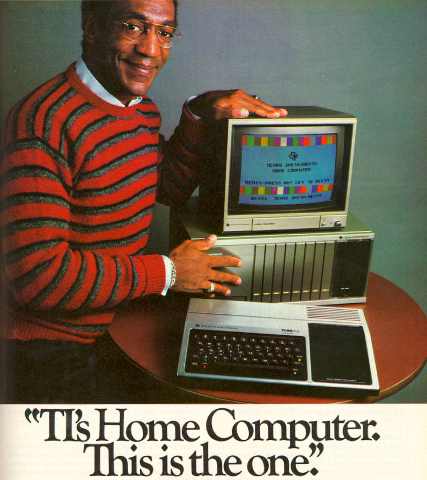
Bill Cosby image from ComputerCloset.org
I'm going through some computer woes with my MacBook Pro (more about that later), so I have been running through my past experience with the dreaded beasts. My experience with computing goes back to the Commodore 64 if you're talking hands-on experience with keyboarded computers. Prior to that, I had some exposure to my uncle's Commodore Vic-20, and the early home gaming units like Sears Tele-Systems (Atari) Pong, and the RCA Studio II gaming console. Of course, after that I've had some experience with countless gaming systems, and numerous other computers, to the point that I'm considered something of a guru, though sadly not with the Apple iUniverse.

Back in the early days, everyone was a novice. And picking which system to align yourself with was all guesswork. Commodore won out for a long time--at least with home systems--but eventually collapsed. Strong contenders were Atari, Texas Instruments and Radio Shack, all of which eventually died off. But it was a fun time, and there's a reason I included gaming systems. . .there was significant cross-over between them and dedicated computers, to the point that they usually took gaming cartridges.  Here are some of the commercials from the days when computers were nerdier versions of video games. See if you remember them. Or if you're too young, see what you missed!


#1 - Commodore 64 - This was the best of the bunch. A computer console with a scant 64K of memory, but endless expandability and creativity. They pushed this baby as far as it could go, and it was wildly successful for many years.

#2 - Atari 400 - This is a generic ad for an Atari computer from 1981, probably the 400. Atari tried so hard to capitalize on their arcade and home video game successes with a home computer. But they never really caught on. Noble effort though, and a great commercial.


#3 - TRS-80 - This commercial is from a later model. Radio Shack's little computer chugged along for years on fumes. I remember a friend touting the superiority of his first-generation TRS 80 to our Commodore 64. The truth was, his TRaSh 80 was little more than half-step past Pong.

#4 - Texas Instruments TI99/4a - TI made it big with calculators, and so they tried to get in on the home computer craze. The case was cheesy, and the computer was lame. But they got Bill Cosby for their ad!


#5 - Coleco Adam - Adam was the logical outgrowth of the popular ColecoVision, and both systems had adapters for the Atari 2600 game cartridges. Probably was a victim--like the others--of trying too hard too soon. Technology just wasn't there to make these things practical workhorses.

#6 - Apple II - Apple probably got to where it is today by insinuating itself into schools early. Every school with a computer lab in the early 80s had the Apple II, Apple IIc, Apple IIe or Apple III. I knew nobody who had them at home, but this was right before the first Macintosh, and really is where they got their start as a known entity.

Sadly, I couldn't find commercials for other early computers like the Timex Sinclair, and after that they get pretty obscure anyway. Of course. Atari, Commodore, Radio Shack and Texas Instruments tried other models, and some were moderately successful for a while. But when first the Mac and then Windows caught on as home systems, it was all she wrote for these other guys.

So, that's it for this weekend's edition. Have a great week, everyone. Happy Monday!

Tuesday, February 5, 2013

Free, Fast, Nationwide Wireless Internet?

Whee! Image from Raw Story.
Over the years, I've gone from basic cable and home telephone for maybe $40 total (we're talking 1986ish), to three land lines and extended cable (late 90s) for somewhere between $80 and $100 per month. Eventually, dial-up modems were replaced by cable modems, and we whittled down to one phone line, with more advanced cable, and we were firmly over $100. In 2004, we got our first cell phones for $60 per month total, added to our now $135 (at least) cable and $25ish land line. Cell phones became smart phones, the land line/internet/DVR/cable package is now bundled, and we're talking $130 for the phones and $200+ for the cable. We're at over $330 per month for various forms of media, and we don't have everything. No, we cut Starz, no Cinemax, no whole-house DVR, no iPhones, no iPads. But I have a hard time believing we're paying what we already are, so haven't added anything in a while.

But imagine that the internet portion was free. And everywhere. Imagine that devices grow with this, and change. I have to think that cell phones would become fully internet phones, no provider. Land lines would become redundant. With services like Netflix and so much content online, cable would be (and sort of already is) replaceable. All other things remaining equal--other than the cost of devices--my media bill could be $0, excepting Netflix or other specialty services.

Or could this be Skynet come to life?
There is no way in hell that Time-Warner, Sprint, AT&T, Verizon, Cox, ComCast and CenturyLink are going to take this lying down. If it looks like free wifi is on the horizon, there will be massive lobbying to fight it, curtail it, throttle it, hobble it. For a time, they might try to innovate, offering more for less. Maybe they'll finally take cable a-la-carte, allowing to pick whatever channels you want. There would still be subscription services like HBO and Showtime.

Our newly evolved net-phones would have to be produced by somebody, and you know that if they can't hook you for data, they're going to get you with the device. There will still be the latest and greatest, and it won't be free unless you sign a contract, right? So, you know the providers will survive. But I've got to think it would bring the price down from the stratosphere.

[Excerpt]

FCC chairman developing plan for free wireless Internet access: report

The chairman of the Federal Communications Commission (FCC) is developing a set of proposals that would establish a public wifi network that blankets the country with a high powered signal anyone can access for free, according to The Washington Post. Such a sweeping change would be years in the making, but companies lobbying for it say that universal Internet access could spark an explosion of innovation and help usher in a new age of prosperity. . .

Read more at:  Raw Story

Saturday, January 7, 2012

Mac Vs. PC, The Experiment Continues

Okay, so I've had my "new" MacBook Pro for a few weeks, and I thought it was time for a status update.

This is a PowerBook and the early Macbook Pro
side-by-side.  They look very much alike,
only with different ports, and an iSight camera
on the Macbook.
A little background first. I've been a PC user/guru for nearly as long as they've been used in the mainstream. It really wasn't until the late 1980s/early 90s--when Microsoft Windows 3.0/3.1 really took hold--that the average American began to become familiar with them. That's when I started to use them for work and that is when I started taking to them like a fish to water. We're talking the days before hard drives, and booting from DOS. Anyway, as Windows grew, and megabytes turned to gigabytes, megahertz to gigahertz, floppy drives to hard drives to optical drives to flash drives to the cloud, I've been a PC.

In my career as a graphic artist, I've been a PC. Haughty Mac users have for years looked down their noses at me, since you "can't do" graphics on a PC. This is hogwash of course. And as a graphic artist in the sign industry (much as in the embroidery world), the PC has always been the platform of choice. CorelDRAW grew up with the PC, as did proprietary sign-making software. I have had no problem doing anything on the PC that a Mac user can do. In fact--in my experience--Mac artist often (very often)--cheat in their drawings, using special effects, extra shapes, masks and other tools to make their drawing look good on the screen or on printed paper, but useless for making a real-world product.

The Adobe CS5 Suite. Pricy.
So, as you can tell, I've had a bit of resistance to accepting the Mac in my PC world. But more and more, I'm finding that I need to use Adobe Illustrator to manipulate other people's graphics. Some drawings in AI (an almost default file format) simply do not translate well when moved into other programs (again, all of those cheats and special effects). My working knowledge of AI is very basic. With my mastery of CorelDRAW and sign software, using AI is painful. It is much less user-friendly, and many of its features seem difficult (backward, in some cases) compared to my second-nature shortcuts and mouse clicks in the other programs. Adobe PhotoShop is even worse in that regard, when Corel Photo-Paint is easy.

But you know what? If I ever need to know AI or PS (or even the rest of the Adobe Creative Suite), I'd be set adrift in an unfamiliar world, despite my 20+ years of computer graphics experience. So, a couple of years ago, I decided I'd better learn, if for no other reason than I'd be able to bring something to my current job, and increase my knowledge for a future one, should I ever need it. I decided that I should buy a used computer with the software pre-loaded, in order to save costs (the Adobe suite costs over $1,000, not counting the computer). And I also decided, it should be an Apple Macintosh computer, since the goal is learning, and because I had no familiarity with it.

The "spinning beach ball of death" A common
problem with my PowerBook. As bad as the
Windows hourglass or blue circle.
After chatting with a friend on Facebook, I found a used PowerMac laptop for $300 with a pre-loaded CS3 suite. Initially, this worked out great. I was able to learn a little of how the Mac OS X operating system worked. I was able to get (somewhat) comfortable with where everything is, and how to do it. I even tried a few lessons with the Adobe Suite. But the machine was infernally slow. It was (to be fair) at the time a four-year-old computer. But, even with my addition of a 1 GB memory stick (bringing it to 2 GB), it was nigh useless for any serious project. Unless I wanted to drive myself mad.

Travis--a teenaged son of a friend and Cult of Mac adherent--reasoned that I couldn't judge a Mac based on an "old" computer. This may be true, but a four-year-old top of the line computer ought to keep up with an even older bottom-of-the-barrel PC. It sure as hell ought to be able to surf the internet without bogging down, and displaying the "spinning beach ball of death" every 10 seconds. Shouldn't it?

Eventually, I had to just throw in the towel, and admit that my old Mac wasn't going to cut it. I never did get comfortable with CS3, because I couldn't stand the frustration. So, I sold the old Mac on eBay (buyer beware!), and bought a newer old Mac. This time, it was a Macbook Pro, with a Core2Duo processor and 4 GB of RAM. I ended up winning an eBay sale, nearly panicking when I did so, not sure I got the right thing. Upon receipt though, I found that I could scarcely have done better. I got the last Mac model (early 2008) before they started making them out of a single piece of aluminum (unibody). It's the top-of-the-line, but "old" enough not to be too expensive.  It's as old as the PowerBook was when I got it, but newer than this here blog is.

As I was hoping, this Mac is not only better, it's awesome! If I had gotten this one the first time, by now I might be a Mac/Adobe aficionado! Though I haven't yet completed a project in CS5 (yes, it came with the NEW suite!), I fully intend to. I'm armed with a stack of OS X Lion and CS5 books from the library. And this time, it isn't going to be torture. The new computer is quite zippy, the memory-hog programs open in seconds. The computer will even reboot in less time than any computer I've ever owned. To date, the "spinning beach ball of death" has only ever spun for a second or two, where it was a continual presence on the PowerBook.

So, maybe I'm a little nerdy and smart like
John Hodgeman, and a little cool and savvy
like Justin Long?
As far as my PC vs. Mac feelings go, I can't say I'm a Cult of Mac convert yet. It isn't better, it's just different. I have a brand new quad-core Dell PC as my desktop setup, and it's is faster, though not by much. I'm still much more familiar in a PC environment, and can "get under the hood" much faster, and with much more assurance. But my MacBook will continue to be my casual use go-to, since it is portable. It will go with me on trips. And I'm no longer soured by the nearly useless experience with the PowerBook. I only worry that this Mac will grind itself to uselessness as it ages. PCs can be re-souped up even in older age to at least be used as internet terminals. I hope this Mac can do the same.

I'll be posting the results of my first Mac graphics experiment (the first successful one, anyway!) once I have it done, hopefully this weekend. If you are a PC who is bi-curious (in the computer world, silly), I can recommend staying away from Motorola-based older Macs, but Intel Core2Duos or above? Go for it! But weigh the pre-loaded software models heavier. As expensive as these suckers are, you'll be discouraged otherwise.

Sunday, January 1, 2012

Blast from the Past: The Amazing World of Computers!

As I write this in the late afternoon on Sunday, I'm saddened by the fact that my vacation is almost over. Don't cry for me, though. Though the vacation-at-home was unpaid, it was greatly anticipated, and thoroughly enjoyed. Ten days! It's just amazing how fast they can go by, and how little of what was planned actually got done. At this time tomorrow, I'll have finished my first day back at work, and have just three more days before my usual three-day weekend. So it's not so bad, is it?

Frankly though, I'm a bit out of the blogging habit. I've managed to get a few things up, but largely took a break from my hobby as well as my work. I did manage to use my new(ish) MacBook Pro, but alas, didn't learn much new. In fact, I mostly played Bejeweled 3, and surfed the internets!

Now, I sit in front of my PC, wondering what to make this post about. With the Iowa Caucuses two days away, naturally I'm thinking politics. But that's not very fun. I've watched quite a few movies this weekend, but that doesn't make for a post either. Then, I was thinking about this PC, my Mac, my older Mac, the computers I just got rid of to pay for the Mac. And I realized I've had a lot of computers. Some of them would barely qualify as a doorstop now! So, okay, I wonder if I can find some old computer commercials and videos? Let's see. . .

1. Bill Bixby for the Radio Shack TRS-80! This was a last gasp for that brand.
2. Commodore 64, the first computer I ever had.


3. Atari 400 computer, an attempt to grow the brand from a video console.
4. Bill Cosby for Texas Instruments, a contender for a brief time.


5. Dick Cavett for the Apple II.
6. IBM "PC Jr." Yes, that was a real thing.


7. Commodore Amiga, a computer ahead of its time.
8. Microsoft Windows 3.1. It's not a computer, but it was the birth of Windows as the software we all use on our PCs.


And with that, I'll close for now. Partly because these Blast from the Past posts are extremely difficult to format. The Blogger software EATS the videos while I'm editing, I'm not kidding! Anyway, have a great new week, new month and new year!

Wednesday, November 23, 2011

Worst Passwords

Sometimes passwords are important, sometimes they are not. For instance, my AOL password (yes, I still have one. . . bitch.) couldn't be used for much, unless you're commenting on gay/atheist/cannibal websites. My BofA password is a little more sacrosanct. So, I have an assortment of passwords, most on a theme. And yes, occasionally, I have to hit the "forgot password?" links. But I think most people would have a devil of a time figuring mine out, unless you're The Other Half. And his memory is swiss cheese, so even that's not a worry.

[Excerpt]

Worst passwords of 2011

If your email password is "password," or "123123," you may want to change it immediately to avoid identity theft, says U.S. based Internet security company SplashData.

"Hackers can easily break into many accounts just by repeatedly trying common passwords," said SplashData's CEO, Morgan Slain. . .


Read more: The Vancouver Sun

Wednesday, October 5, 2011

Apple Co-Founder Steve Jobs Dead at 56

Image from source, Huffington Post
As a PC-user for over 25 years, I have very little nostalgia for Apple, its products, or its founders. I often found Apple products kind of cloying and cutesy, sometimes trying too hard (the iMac that looked like a little white ball), or not trying hard enough (the toilet-seat laptop). But, I do recognize Steve Jobs' contribution to the 20th and 21st century, and find it sad that he died so young.  For even though I didn't much use his products until relatively recently, I do believe that the popular products produced by Apple spurred even non-Cult-of-Mac people to want MP3 players, to want zippy computers, to want tablet computers, and most obviously, smart phones. RIP, Steve.

[Excerpt]

Steve Jobs Dead: Apple Co-Founder Dies At 56

. . .Apple has lost a visionary and creative genius, and the world has lost an amazing human being. Those of us who have been fortunate enough to know and work with Steve have lost a dear friend and an inspiring mentor. Steve leaves behind a company that only he could have built, and his spirit will forever be the foundation of Apple. . .

Read more at: Huffington Post

Tuesday, May 24, 2011

Science is Cool: New Internet Tech Goes 26 Terabytes Per Second!

Okay, technology is officially now going too fast. It wasn't too long ago when we were asking, "What comes after gigabyte?" The answer is terabyte, and it has become increasingly more common to measure data at that scale. It's not unusual to find a full terabyte hard drive on new computers. If you're really getting spendy, you might get two. And as with gigabytes, megabytes and kilobytes before, we always think, "I'd never need more space than that!" We manage to grow into it somehow.

But the different measurements are also used to denote the speed at which you can upload and download things. And in that case, we're still pretty solidly in the mega- range, not the giga- or tera-. But now it may be possible to transfer data at scary fast speeds. If this becomes commonplace, using computers in "race the clock" type action movies isn't really going to work anymore is it? "Somebody's coming! Hurry! Oh, you're done? Great!"  By the way, if you're wondering what comes after terabyte, the next leaps in technology will be: petabyte, exabyte, zettabyte and yottabyte. After that, we start moving through time, I think.

[Excerpt]


New Internet tech transmits data at 26 terabytes per second
 
In a dramatic breakthrough, scientists have learned how to use optical fiber to transmit data over a single laser at speeds that dwarf even today's fastest Internet connections. . .
 
Read more at: Raw Story

Thursday, December 16, 2010

Is Microsoft an Underdog?

This past week, while I was back in Ohio, I ended up--as I often do--doing a lot of computer repairs for my family. I recreated Mom's defunct home wireless network, I resucitated Mom's year-old but dead as a doorstop HP TouchSmart computer, I refreshed Mom's slightly older notebook computer, and helped salvage a hard drive from my sister's and brother-in-law's ancient business computer (destroying the rest of the computer in the process).

Image from source, Huffington Post
These procedures were performed on machines running various iterations of Microsoft Windows (Millenium Edition, XP, Vista and 7), all with their attendant ideosyncracies. Along the way, I got to thinking, what's the future of Microsoft anyway? While the overwhelming majority of computers still run on one of those operating systems, the era of boxed software on a specific platform is clearly waning. Even a long-time Mac-O-Phobe like me now owns a Mac. We've got smart telephones with their own software (only a minority of which are run by Microsoft software). We've got PS3s and Blu-ray players that wirelessly connect to the internet. There are countless other devices, new ones all the time, and many of them are neither Microsoft Windows, nor Mac OSX related. And even when they are, there are tons of ways to get your work done without laying out $300 to upgrade to the latest Office suite.

For years, it has been obvious that we're headed to some sort of convergance of all of this technology. The real winner is going to be whatever company becomes dominant in tying together our entertainment systems, computing systems, gaming systems, cable, and telephone into one cohesive, interconnected thing. That's my opinion anyway. And who knows, it could be Microsoft. Or it could be CyberDyne Systems, and we could be headed for the dystopian future of The Terminator.

[Excerpt]

Microsoft's Cracked Windows: How The World's Technology Juggernaut Lost Its Buzz And Became The 'Underdog'


. . .Microsoft as underdog. At the beginning of this decade, this description would have been ridiculous, like referring to the Yankees as an unsung, longshot baseball club. From the spread of personal computing through the dawn of the World Wide Web, its software governed the desktops of more than nine in ten desktop computers. Microsoft was so dominant that it became a symbol of monopoly power run amok, supposedly snuffing out innovation. Its rivals affixed pejorative labels like "Death Star" and "Evil Empire. . ."
 
Read more at: Huffington Post

Wednesday, August 11, 2010

Greenlee Gazette Goes Mac

Okay, as a Mac-O-Phobe, I have to state right out in front that I'm not officially "switching" from PC to Mac.  But I am broadening my horizons, and I am retiring my old (very, very slow Dell Celeron PC) computer to the guest room.  I got the idea one night a couple of weeks ago when the Windows 7 "whited out" repeatedly, and that--originally gorgeous, now merely annoying--blue circle would just spin for no reason.

When this happens, the computer is obviously doing something, I just have no idea what.  My first thought was to drop the computer from an extreme height, enjoy the destruction, and then buy a new Dell or HP to replace it.  Then a bell went off in my head.  Maybe I should consider a Mac.  Not because I hate Microsoft, but because I have zero experience using a Mac, and almost none using Adobe graphics products.

Now, I have no intention of quitting my job, especially in this climate. But I realized that I'm wasting away my (mandatory) Fridays off, and that I should probably find a project. What better way to exercise my brains, gain some knowledge and experience, and boost my resume than to learn how to do graphics on a Mac?  It could even help me with my current job, should we receive a file in this format.

But I didn't want to just run out and buy a new MacBook. That's an expensive experiment.  So, I put up an inquiry on Facebook, and very, very quickly got a response from my friend Tracy. She knew a guy (my new friend Ron) who had a PowerBook G4 for sale. After some back-and-forth messaging, and some advice from friends, I decided to go for it. Especially when I found out it was affordable, and included all the Adobe and Microsoft software I'd need to really complete my experiment! Woo-hoo!

Ron did a great job packaging the Mac up, and it was no problem to set up. There was a slight worry when I ran a software update, which took way longer than I thought it would.  But after that, it was easy-breezy. I'm using it now!

I know that beyond upgrading the memory, this machine is maxed out. Apple no longer updates their MacOS X for this model.  And yes, my friends Travis and Stupid Monkey Planet warned me about that. But this is just to get my feet wet, and my brain acclimated.  Once I'm fluent in MacIntoshese, maybe I'll jump in with both feet. But if anyone ever sees this blog become an affiliate of The Cult of Mac, send in the anti-cult brain-unwashers for me, okay?  I don't want to become a shill for any corporation!

I'll probably get some more RAM for it, just to max it out to its limit. And I'll have to learn (and unlearn) tricks and shortcuts (such as a keyboard shortcut for italics and bolds, etc.), and learn about the file structure and differences from Windows. But I thank Ron and Tracy for this chance to embiggen my brain!

Thursday, March 11, 2010

It's a Google World, We Just Live in It

This video is a little creepy. And if you think you're eluding the Google beast. . .hello! This blog is hosted by Blogger. . .a Google company. My question is, how do they keep making all of these free services, and still be worth so much money?

Sunday, September 6, 2009

The Technology Trap


When I was a little kid, I remember my mother turning on the TV right as an episode of one of my favorite shows, Bewitched, was ending. I recall saying that some day, we wouldn't just be able to pick a channel, we'd be able to pick what show we would watch. I remember looking at the channel selector knob, trying--and failing--to imagine what that knob would look like with different shows on it, instead of channel numbers.

None of us could have imagined what we now have at our fingertips, not just on our TVs, but on our computers; even our phones. My highly indexed trivia stores in my brain are now completely useless with Wikipedia, IMDB, Google and Bing. But thanks to DVD, Blu-ray, DVR, Hulu and other web resources, my 5-year-old self gets to experience his wish as he never dreamed. . .albeit in a 43-year-old body. And he also gets to pay a ridiculously high cable/DVR/broadband/digital phone bill every month.

I'm experiencing a bit of a problem now, with all of this technology. With a four-day weekend within my grasp, but with The Other Half away for most of it, I had to plan around my tech obsessions. I had to make a checklist--actually done on an actual pad with a pen, imagine that!--to make sure I got something done each day. And I've actually done so. But I need to get out of the house and run some errands, and what am I doing? Sitting here blogging, because the idea for this post came into my head while I was showering.

It used to be that I'd sit at my desk on my computer, with the TV on for noise. A great show could pull me away from the computer, but usually, it was just to keep me company. Now, I'm finding myself doing the reverse. While watching TV, I'll actually pull the laptop over, and check on who is in the program, what reviews there are of it online, OOH, I got mail! And look, Tracy just said something on Facebook! Oh, wait, I have no idea what just happened on the show I'm watching!

Fortunately, the best $10 of my extremely expensive cable package is the DVR which lets you back up live TV. Awesome. But I figure, between DVDs, DVR, Blogger, Facebook, AOL and plain old television, I'm spending 80% of my awake time at home in front of some sort of screen. And I do approximately the same thing at work. It doesn't help that the DVDs have "extras," and that the internet has time-suckers like those mentioned above, and things like FailBlog.org and Engrish.com that suck me in for hours at a time. Sigh.

Well, I know what I've got to do. I've got to post this little nugget, close the program, close the lid on the computer, and get out in the world! Lucky for me, I got up early and all of this techno time sucking happened by 1:00 pm! There's still some day left, after all.

Related Posts Plugin for WordPress, Blogger...