Showing posts with label Hewlett-Packard. Show all posts

Wednesday, August 14, 2013

Computer Woes Banished!!! . . . (Or Are They?)

It wasn't quite this bad.
[EDITOR'S NOTE: This is computer geek stuff, if you have no interest in that, please scroll on by!]

Ever since I bought my iomega cloud external hard drive, it's been trouble. For one thing, they make you send an email to whatever computer you're going to need access from, and then install their connectivity software on it. Their clunky connectivity software. My aim with this system was to integrate my work experience between home and work. Sometimes I need my work files when I'm home, sometimes I need my home files when I'm at work.

I discovered quite by accident that the Western Digital MyBook Live drive we have at work was itself a cloud drive, but it's come in handy a couple of times. It's very slow, but it always works. So, when I purchased the iomega, it was in the aim of getting pretty much the same thing. It's not. The drive never worked very well, though it usually worked from my desktop computer at home. Remote access was tenuous at best, and nonexistent at worst. I struggled with it for about a year. But when I got my new Windows 8 computer, its faults and glitches became intolerable.

The iomega Home Media cloud drive.
Stay away. By the way, they're Lenovo
now, so don't be fooled!
Problem was, I couldn't be sure that it was the drive that was the main problem. My HP Pavilion 500-037c system came with both Ethernet and wireless connections, and initially, I just hooked up the wireless. Things went swimmingly at first. I installed all my software, hooked up the drive, got everything going, even mapped the shared folders on the iomega. I also upgraded to Windows 8.1, which--if you're wondering--is a much needed improvement over Windows 8. Everything seemed fine, though truth be told, I wasn't up and running for very long before I ran into a small issue.


The new WD drive. So far, it's
better and faster. I will update
if things change. By the way,
it even will link to your
phone or tablet!
In AOL, which I by (18-year) habit use as my main email reader and for some other things, I found that the emails weren't displaying their headers, as in no information about the sender, time, date, or anything. When trying to remedy this situation, I tried the third or fourth solution I found online, which was uninstalling and reinstalling the software. The AOL uninstaller has three components, including a virtual internet adapter (who knows why). Removing that element seemed to be a mistake, though I really can't be sure now.

Anyway, upon restarting, I found that I had no internet connection. More than that, there weren't even any networks listed, where there is usually mine and several others from my neighborhood. After futzing around for a while, it became clear that I'd need to plug into the router with a Cat-5 cable, and even that didn't work without more tweaking. Eventually, I got on through the wire, but had lost the iomega cloud drive! After being frustrated nearly to tears, and having attempted Windows Restore three times, only to be told it failed, I said "screw this" and told Windows to refresh back to its original state. I knew this would mean reinstalling all the software, but supposedly keep my files (which it didn't, glad I had backups).

This seemed to work for just a little while. The iomega drive became much more problematic, only being accessible through Windows Explorer, and then not all the time. The wireless internet came back briefly, and then was gone. I got out a little USB wireless adapter from an old computer, and even that was unstable. And maddeningly, frustratingly, the iomega would only connect while there was a live wireless connection. Otherwise, it would refuse to connect. My MacBook Pro could see the drive through the network (even though it has never been able to connect remotely), but that was it. As I said, it has always been trouble, and I was sort of at the end of my rope with computer troubles. When it wouldn't connect at all from work the other day, I decided I'd had enough.

There's a Fry's Electronics on my way home from work, and I resolved on Monday to buy a new drive on my way home. I figured, hey, even if it doesn't solve all of my problems, it will at least solve some of them. On Fry's very long aisle of external drives, I found WD's MyBook series in a variety of flavors, and compared a few. Lucky for me, I realized that none of them were cloud drives, and moved on down to the end. HAZAH! MyBook Lives were at the end of the row, and no more expensive than the non-cloud versions. Before buying, I told the sales rep my issue, asked what he would buy, and he picked up the one I'd already thought I'd buy. $119 later (same price as my iomega, and 2 terabytes instead of 1), and I had it.

If you're still with me, hey, how ya doin'!  You'll be surprised to know that my iomega stayed active long enough for me to copy its contents onto the new drive. And I was surprised to find that Western Digital has simplified their software to the point of ridiculous ease. And I don't need to install it on the remote computers! I just send an email from my home computer, open it in any browser on any computer, log in and VOILA! The only catch is that it uses Java, which requires irritating updates almost as often as Adobe Reader.

Even better, after I uninstalled the iomega software, and reinstalled my computer's network drivers from HP, things seem to be back to normal. Better yet, the WD drive does not require the wireless adapter to work (it made no sense that the iomega did, but there you go). I am by no means ready to declare victory. The wireless may flake out on me again. But at this point? The router is right next to the computer anyway, and if I can see my files all the time, the wireless really doesn't matter very much. If it flakes again, it will gnaw at my computer guru psyche, but that's all.

But after all of this? The AOL mail headers still don't display. Ain't that a bitch?

UPDATE: Well, the wireless is out again, so it either had nothing to do with the iomega, or maybe it does. . .and there's some kind of crap left over causing issues. But the good news is the drive still works just fine. The bad news is, I'll be on the phone all day on Friday with HP trying to fix the damned thing (or it will drive me crazy).

Sunday, November 20, 2011

Greenlee Gazette Gets New Computer

After all day driving around, buying a computer, bringing it home, realizing I needed parts, going out again, coming back, realizing my old router needed replacing, going out, coming back. . . I'm finally done! Well, done, until I realize I'm missing a program or something.

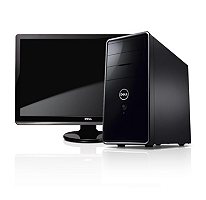
The new computer is a Dell Inspiron with an Intel Core i5 processor and a 24" monitor. All very cool. As always--even though I'm a veteran PC guru--there were ample headches along the way. Primary among them was just the sorting out of the spaghetti wires, and cleaning the desk area, above and below. Then putting it back. The wires are slightly fewer with a wireless mouse and keyboard, but it's still a nest.

So far--after replacing my ancient router--I've had a pretty smooth time of it. The monitor is massive. The computer is quick in everything it does, so far. The new computer accepted my old hard drive and a Light Scribe DVD burner without complaint (though I did have to run out for longer internal cables). I moved all of my music--12,000 files or more--in a matter of minutes from the old drive to the new.

The only thing I have to complain about is the long, tiring day, and the $800 bill! Also, it will be a long time before I buy another Hewlett-Packard computer.

Blogging again hopefully sometime Sunday. Good night!

Saturday, November 19, 2011

Computer Woes: A PC Bites the Dust

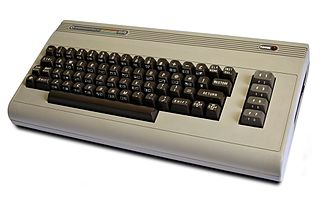
My first computer. Wherever it is, it
probably still works.
I've had nine personal computers, from a Commodore 64 in 1982, to a 386DX off-brand, a Packard Bell Pentium I, a Sony Vaio Pentium III, a Hewlett-Packard Pentium 4, a Dell Pentium 4HT, an HP Core 2 Duo, and two laptops, a Dell Celeron and an Apple PowerMac G4 15 (which I'm using now).

And I'm probably going to have to get my 10th tomorrow. My Core 2 Duo machine promptly died today, while I was away from my desk. No snap, crackle or pop. No poof, or puff of smoke. It just wasn't showing a picture anymore, and the keyboard didn't work.

My doorstop dead computer.
Nothing I've tried helps, and The Geek Squad, via telephone, thinks it's the Motherboard. So, I'm rightly pissed that my HP didn't quite make it to three years of service, and will probably be more efficient to replace than to repair.

The long and short of it is, along with social obligations, I'm going to be very busy for the rest of the weekend, and likely won't be posting much.

Incidentally, not counting the dead one, we have four computers in the house (The Other Half's desktop, my Mac notebook, the unused Celeron, and the "spare" HP Pentium 4 in the closet). All are older--some by a lot--but all are functional. The one in the worst state of repair? The other Hewlett-Packard.

Thursday, May 6, 2010

Demon Sheep!

Did you ever see that "sheep" ad that Carly Fiorina ran in California? It's narrated by Robert Davi, has the stupid term "FCINO" (fiscal conservative in name only), and a man in a red-eyed sheep costume. It was laughably bad, and justifiably mocked.  Now, in a rare case of Democrats actually turning one of these things to their advantage, a hilariously well done ad has been made on the sheep theme. Only they didn't just turn it on Carly, they've taken aim at the whole primary ticket in her race! Well done.

Monday, August 3, 2009

Computer Woes: New Hewlett Packard Croaks

Well, my shiny new (as of 6 months ago) Hewlett-Packard computer blew a gasket this weekend. Or, more precisely, it blew its power supply. It's been randomly restarting of late, but I thought that had something to do with downloading the pre-release of Windows 7. So, Bill Gates can relax, as I won't be sending him an angry letter. Yet.

But HP might not be so lucky. Seriously, WTF? It is true that I rarely shut my computer off, preferring to have it ready when I'm ready to use it. But six months? We used to leave the computers at the bank I worked at on 24/7, and those were 1987 IBM PS/2s! This is the second PC I've owned from HP, and this is the second power supply burn-out as well. Now, I probably could have it fixed for free, since I'm still under warranty. But what a pain in the ass. I know how to change a power supply, and they're inexpensive, so I'll fix it myself.

Trouble is, I broke the power supply connector to the hard drive when unplugging it. I say I broke it, but it must have already been cracked, given I did nothing that should have broken it. So, we drove over to Fry's Electronics, only to find that they close at 7 pm on Sundays, something they don't put on their web site. Poop. So, until after work--assuming all goes well--I'll be using our inferior but serviceable Dell notebook computer, which has never had a power supply issue.

Sunday, January 25, 2009

New Computer: Adapting to Windows Vista


My new computer has been wonderful, and also a headache. Getting all of my software, and all of my hardware to work with Windows Vista has been a challange. I haven't figured out why everyone hates Vista yet, but I am discovering a few of my own limitations.

I started using Windows with version 3.0, and have self-taught myself all of the ins and outs. My familiarity with Windows quirks is quite extensive, but ends with Windows XP SP3, unfortunately. I sorta skipped Vista, except for the basic version I have on my notebook computer. So, the newness of Vista to me is a little baffling. Some of the file structure still confuses me, and because it is not compatible with my old (1995) scanner, I had to get a new one.

I bought a Hewlett-Packard OfficeJet J4580, which is an all-in-one fax, scanner and printer. The instructions are opaque to say the least. And though my computer is also an HP, it refuses to recognize that the new machine is family. So the control panel (referred to obliquely in the manual) says that no HP devices are installed. But it is. And it scans and prints. But I can't set any preferences or change the Fax settings. Arrrghhh. I'm far from a newby, but I'm stumped.

So I have my fourth weekend project. I will solve it. I always do. But what do novices do? I can't imagine.

Sunday, January 18, 2009

Changes at Greenlee Gazette


One more time, I beg your indulgence, while I upgrade my office space. Today--after many abortive efforts, and much study--I bought a new desktop computer for my office. As you probably know, upgrading is more than just plugging in, and getting going. You also have to reinstall any software you used on your old computer, and make sure everything is compatible.

Because of this, posting may be light or nonexistent this weekend. I'll be back after everything is up to speed. My new computer is an HP Pavilion a6537c-b, with a 22" monitor and many bells and whistles. It was a "one more left" special at Sam's Club, and I just couldn't resist. I'll write a more complete review of it, as I get a little more familiar. In the mean time, thank you for reading, and bring your friends!

UPDATE:
This is kinda weird. I'm sitting in my office, and Saturday Night Live has just ended. I've got my old computer (a Dell Pentium 4) performing a "Windows Easy Transfer" to my new computer (an HP Core 2 Duo). It's taking freaking forever (so it is obviously not a "Windows FAST Transfer"), so I'm typing this from our notebook computer (a Dell Celeron). So, I have three computers in the same room! Add to that The Other Half's computer (an HP Pentium 4), and the one sitting derelict in the garage (an old IBM Pentium II), and we have five computers in this house!

I think we'll leave The Other Half's computer alone for now, ditch the Pentium II, store my old Pentium 4 (in case somebody's computer dies), and pare ourselves down to three functioning computers, and one in storage. That also leaves us with a 17" and a 19" flat panel monitor, along with an old 17" CRT. I think keeping the spare 19" will do, and we'll donate the other two monitors to my bosses' sign company.
On top of this, we might be buying a new house, now that we've started renovations here! So, it has been an interesting weekend so far. How about you?

Tuesday, September 16, 2008

Carly Fiorina: Palin & McCain Could Not Run a Company

Boy, political memories sure are short. Do you remember back when Ross Perot was running for President, and pledged to run the country like a company? Quite a few people thought that was just a swell idea. I guess that was then, and this is now.

Carly Fiorina, one of John McCain's most powerful surrogates--and former head of Hewlett-Packard--was asked if Sarah Palin would be capable of running HP. Fiorina said "No," and that John McCain wouldn't be ready for such a job either. Wow. Presidentin' is easier than being the figure head of a company?

Thursday, June 12, 2008

McCain Campaign Reaching Out to Women Voters


Photo from source, Washington Post

I guess the prospect of ex-Hillary Clinton supporters allegedly defecting from the Democratic Party was enough to make John McCain to think he can poach more of them away from Barack Obama. I'm not sure how a computer company CEO is supposed to relate to Clinton's older, non-college educated, women voters, though. I don't know much about Carly Fiorina, but I've heard and read her name a lot the last couple of days, so thought we all better brush up on her.

[Excerpt]

McCain, Obama Reaching Out to Female Voters

Sen. John McCain and his aides have gone out of their way to praise Sen. Hillary Rodham Clinton in recent days, and by the end of the week his most prominent female supporter, former Hewlett-Packard chief executive Carly Fiorina, will embark on a female-focused speaking tour in Ohio and Pennsylvania. . .

Read more at: Washington Post

Saturday, April 26, 2008

Windows XP: Not Dead Yet!


Microsoft's popular Windows XP operating system has been out for years and years, and would ordinarily be considered obsolete. Remember how stale Windows 95, Windows 98 and especially Windows Me looked after the new versions came out? That is what should have happened to Windows XP when Microsoft introduced Windows Vista.

Vista is a glossy, slick, attractive operating system, though I suppose it isn't as awe- (and cult-) inspiring as the Mac's. But Vista has been plagued with problems. I haven't experienced them, so I can't write from personal knowledge. We still have XP on our home computers, on all of our work computers. . .excepting two laptops, one at work and one at home. Those systems are secondary. . .only used on occasion. So no problems yet.

Microsoft is putting Windows XP out to pasture in June, probably in the hope that more people (like me) will make the switch. But it looks like some of the computer manufacturers have found a loophole that will let them keep selling XP machines to their customers who want them.

[Excerpt]

PC makers find ways to extend XP's life

Facing a June 30 deadline to stop selling PCs with Windows XP, the world's largest computer makers are getting creative.

Taking advantage of the "downgrade rights" offered as part of the Windows Vista license agreement, Hewlett-Packard and Dell both plan to offer machines loaded with XP well beyond June. . .


Read more at: CNet
Related Posts Plugin for WordPress, Blogger...