Showing posts with label Windows XP. Show all posts

Wednesday, March 12, 2014

Warning to Computer Users: Windows XP Being Put Out to Pasture

If you have an older computer, it's almost for certain that it's running Windows XP. Am I right? Maybe Vista, if your machine is really ancient, 98 or Me, but most likely, it's XP. And your frugalness is about to come to an end. Microsoft plans to stop releasing updates to the program in a few weeks, which will leave your computer vulnerable to viruses, malware and your basic nuclear annihilation.

People are already starting to stamp their feet about it. How dare they! Don't they know a huge chunk of computer users still have Windows XP? Yeah. But how long were they really supposed to support the thing? It came out in 2001 you guys. Actually, just a couple of weeks before September 11, 2001. The whole Bush administration and five years of the Obama administration have happened in that time. Were we supposed to get hip-deep into the Clinton (or, shudder, Cruze) administration before they pushed it into its grave?

The fact is, Apple stops supporting its products after just a few years. Microsoft's alone in supporting what amounts to ancient software in computer years. But I'm in the same boat. Though our home systems have Windows 7, Windows 8.1 and OSX Mavericks, at work we must have seven or eight XP machines. After the 2008 financial collapse, we didn't upgrade much. To make matters worse, our software upgrades pretty much stopped with our hardware. . .and the old stuff doesn't run well on new machines! So, we're going to (finally) have some decisions to make.

You've been warned!

[Excerpt]

Microsoft to Take Windows XP Off Life Support Despite Its 29% Market Share

Change: It’s inevitable in and of itself, and it’s inevitable that some people don’t like it. Ars Technica cites a report from Net Market Share contending that Microsoft’s almost-13-year-old operating system, Windows XP, can still be found on almost 30% of computers that connect to the Internet. . .

Read more at: Time

Sunday, December 27, 2009

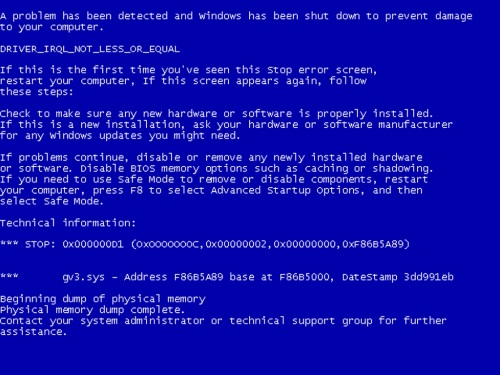
Blue Screen of Death NOT Vanquished in Windows 7


Image from Photobuok
Sigh. I like Windows 7, I really do. It's pretty. It's sleek. It's faster than earlier versions of Windows. And I'm a Mac-o-Phobe, so I have plenty of motivation for playing up Microsoft's newest operating system. But moments ago, I was stopped in my tracks by the dreaded Blue Screen of Death. While doing. . .well, basically nothing that ought to cause such a thing.

The Blue Screen of Death (BSoD), for the uninitiated, is a fatal error on a Windows computer. The screen turns blue, with white or light blue text on it (a less common varient is the Black Screen of Death). The text is meaningless--like it is on any Windows error box--to anyone but someone who speaks machine language, or your mythical, all-knowing "system administrator." Unlike other errors, however, there is no coming back from a BSoD. Whatever you were working on is goneski. You might easily be able to reboot your machine, or you might have to physically unplug the thing. On rare occasions, even your friendly neighborhood computer guru (like me) can't help you, and you're either off to the Geek Squad, or to buy a new computer.

This morning, on my laptop computer (an admittedly entry-level machine), I had open AOL 9.5, Internet Explorer 8 and Spider Solitaire. Unable to endure the Sunday morning chat-fests with undivided attention, I was mid-move in the solitaire game, actually hitting the "M" key to get a hint on my next move, when DINK! Blue Screen of Death. Instantly, no segue, no warning. Now, the computer did almost immediately restart, Windows loaded quickly, and I was informed that I'd recovered from an error, and that the computer would report the problem to Microsoft. A little creepy, but all right.

But isn't this BSoD issue supposed to be vanquished? Couldn't Microsoft have at least changed the colors or appearance of it, just out of shame? Go ahead and laugh, Cult of Mac. Sometimes we deserve it. Just remember, your "perfect" system has its issues too. . .


Monday, July 13, 2009

What I Did With My Sunday: Windows 7


OK, so dangle a new toy in front of me, and tell me I can have it for free, or at least sort of on a lay-away program, and you've got me by the nose. The computer I'm using was purchased on a whim, after lusting over new computers for several months. When I found a "last one" at Sam's Club for $711 (down from the high $850s), I just had to have it. The thing about this story that made it almost free was that my mom had bought new computers for my brother and sister for Christmas, and agreed to pay for $500 of the total bill. No brainer right? So, I bought it.

Of course I forgot about the hassle of getting all of my old programs onto my new computer, and making it. . .well. . .kind of exactly like what I had. Sort of. It's faster, newer, has more storage, more RAM, a 22" monitor, and it has Windows Vista Home Premium instead of the old Windows XP Home. I got my feet wet with Vista Home Basic on our notebook computer, but that's just my noodling in front of the big TV computer. I do all of my real work in my office.

So, I had to familiarize myself with Vista, and how it works. Having grown up with Windows from version 3.0, each new version brings its joys and its headaches. I'm still not quite fluent in Vista, but I don't know what so many people are complaining about either. Works just fine. But all of that is moot now, because I've taken the Windows 7 plunge.

If you haven't heard, you can download the "release candidate" version of Windows 7 for free at Microsoft's site. It won't stay free of course, but it will be for a while. And I've already pre-ordered two copies of Windows 7 Home Premium at their site as well ($49 ea., which ain't bad) for when the free versions expire. But I may have forgotten a lesson I learned when I beta tested Windows XP several years ago.

See, the download on the notebook was to upgrade the 32-Bit Home version of Vista. What I didn't find out until it was installed and running, was that the install version is Windows 7 Ultimate, the big daddy--quite expensive--version. And since I had to do the "clean" install (more on that in a minute), it can't be undone to my knowledge. When this happened with XP, I was forced to upgrade to the higher version (then XP Professional), because the lower version couldn't be done. So my newly ordered product may not work, and I may have to pony up bigger dollars. Yikes.

The thing is, I thought I'd made a mistake of some kind on the laptop, or that the clean install was the culprit. And with the tantalizing "new toy" aspect of the deal, I went ahead and installed the 64 bit version on my desktop computer as well. It turned out to be the Ultimate version too. But it doesn't tell you that until it is done. This time, though, I was able to do an ordinary install on top of my old Windows. And one of the options at startup now, is a rollback, so I'm hopeful (really, really hopeful) that it will do just that, and allow me to install Home Premium later.

That all said, I really dig the new Windows. Things I learned along the way still apply, and everything has been easy to find. I've been able to tweak things to my preferences, and all of my old programs and hardware still seem to be working. Of course it's all new, so that may turn out to only be partly true. The laptop particularly has sped up considerably, and the screen which was only passable before is beautiful now. Startups and shutdowns are faster, and the computer doesn't require constant "reminders" about just what a wireless mouse is.

Practically speaking, I can't tell you if you "need" Windows 7. It's very pretty. It's fast--that was the selling point for me--even on my old Celeron laptop. But what's with that name, anyway? Windows 3.0, 3.1 and 3.11 were named like every other program of the day. Then came Windows 95, 98, 2000 and Millennium Edition, which were bad ideas for names, because they looked silly even a year after they came out. Windows XP sounded like it was trying too hard, and Vista sounded kind of pretty. Going back to numbers seems kind of retro, but not in a cool way. I think I'd have gone for "Windows Now" or "Windows Next" or something, and just kept it there, consistently upgrading the same-named product. I don't know.

I'm sure I'll be posting on the subject again, should problems or discoveries arise. Meanwhile, if you're like me, and can't stand ignoring a new toy, I have a few pointers that might save you some time and trouble.

- If you're worried about not being able to roll back changes, and later having to pay a $300 upgrade price, skip it and wait until October when Windows 7 is released. Or, remember that the free version will work until May of next year, which is plenty of time to save.

- You will need a DVD burner (or possibly a 4Gb+ removable flash drive) to start your install. But first, you have to download the "ISO" file from Microsoft.com. Once it is done downloading, you double-click it, and your DVD burner program opens up. So if the computer you are upgrading doesn't burn DVDs, you can still download it on one that does, and burn your disc there.

- You need a clean, unburned DVD, or if you have old rewritables, have several at hand. You can erase a DVD/RW, but one of the first one I tried continually produced errors. This lead to three or four annoying aborted installs. I blanked another one, tried again, and it worked just fine. So remember, if you get "Error Code: 0x8007045D" or some such, try again with a different DVD.

- If you don't have a lot of programs installed that you care about, or if you don't mind reinstalling them, you can choose the "clean" install option, which is like buying the computer with Windows 7 already installed. Your entire old Windows folder is renamed "Windows.old", so everything remains on your computer, but the programs there mostly won't run anymore. But hey, brand-spanking-new Windows with no clutter.

- The process (even when successful) can take an hour or more, so if you need your computer, plan some time for it to do its thing. And be prepared for errors, like a program it finds that is incompatible, or the aforementioned data error on the DVD.

It isn't painless (paneless?), but this kind of thing has always been fun for me, in a tear your hair out, grumbling four-letter words sort of way. Hopefully, if you're reading this, it can ease some of that for you.

Oh, and by the way, I saw a new display of computers at Sam's Club this weekend. Better than my 6-month-old Core2Duo computer in every measurable way, including screen size. The price? $699. Unbelievable. And a great deal. But I'm not tempted. Are you?

Sunday, June 14, 2009

Windows Not Responding. . .Why the Hell Not?

I'm presently working on reconstructing a neighbor's infected computer, something I do from time to time. She'd unwittingly installed an "anti-virus" program which is really a scam. Insidious bugger too, tangling its feelers into all sorts of places on the computer (it's called "Personal Antivirus" just in case you ever run across it. DO NOT install it, it is garbage).

But this sort of challenge has always been fun for me, so that is not what is bugging me. The neighbor's computer is a Windows XP system, and I'm very comfortable with that. The computer I'm using at the moment is a Windows Vista Home Basic system, and my desktop computer in the other room uses Windows Vista Home Premium. Unlike many users, I really don't have much of a problem with Vista, short of a relative lack of familiarity with it, as opposed to XP or Windows 95/98/Me.

But there is one maddening element of Vista that drives me to distraction. I usually run Internet Explorer and America Online at the same time, and use them in tandem (probably much to the horror of FireFox, Mac and Linux users). I run the blog and its attendant services in IE, and do all of my reading and research in AOL. This works out great, until it doesn't. I'll ALT+TAB over to AOL from IE, and I'll get that shiny blue spinning "O" cursor, which is a replacement for the spinning hourglass. This may go on for many seconds, and out of frustration I'll click the mouse. At this point, the screen fades to white, like a fog has descended over Windows-land.

Even though this happens with some frequency, I'll try to go back to the other program. But ALT+TABBING either doesn't work, or it works in a molassessy time warp. Occasionally, if the ALT+TAB brings up the "open programs" window, it will be slightly out of focus, and frozen in place. Moving the mouse down to the toolbar only changes the cursor from the "O" to a double-edged arrow, as though it is trying to resize the toolbar. This can go on for 30, 45, even 60 seconds before the system starts to respond. And there is no consistent pattern for when it happens, and I have no idea why it happens. Always, there is a message in the title bar: "Not Responding." And my unanswered question is still: "Why the hell NOT?"

I'd chalk it up to the weak Celeron chip in my notebook computer, were it not for the fact that my desktop does this too, and it has a Core 2 Duo in it. I'm willing to concede that it might be AOL, which has always had a disturbing ability to disrupt the multi-tasking abilities of any computer. I suppose it could also be Internet Explorer 8, or maybe the interplay between the two programs. Unfortunately for me, I've grown quite set in my ways, and will likely continue with this setup, despite the frustration. But I'd still like to know what the hell my computer is actually doing when it gets stuck in one of those loops.

Saturday, March 7, 2009

I'm A PC; And I'm Irritated


We have three active computers in our household, an HP Core 2Duo desktop with Windows Vista Home Premium 64-bit; a Dell Pentium 4 desktop with Windows XP Home, and a Dell Celeron notebook with Windows Vista Home Basic. This is after some upgrading, Frankensteining and shuffling around from our previous home network, which used to be 100% Windows XP.

Now, I've been a "PC" for almost as long as Windows has been around, surely as long as it has been mainstream. I started with version 3.0, and have been a self-taught Windows "guru" through versions 3.1, 3.11 for Workgroups, Windows 95, Windows 98, Windows 98 SE, Windows Me, Windows XP Home, and Windows XP Business. As the version numbers climbed, I learned new things. Networking has always been a headache, and each new version seemed to add a layer of block-headedness when it came to things the user is "allowed" to do.

Often, a Windows user trying to use network connections (or even just change settings on a stand-alone computer) is confronted with "access denied" type messages. "Ask your network administrator" is a particularly annoying message when there isn't one. Right now, all I'm trying to do is share files and printers across my network, from my Vista Premium machine to my other two computers. And. It. Refuses.

Any attempt to add my printers to the other two computers asks for a login and password, something I do not even have. Sometimes, I can't even access files on the very computer they exist on. I had to monkey my way through the security settings to look at music and pictures right there on the hard drive. Microsoft's changing of their file structure and security have rendered this Windows "Guru" a clumsy fingered moron. So far, I haven't experienced the Windows Vista-itis that so many complain about, except for my lack of understanding about how it works "under the hood."

So, I'm off to the Google to see if I can stumble into some answers. Feel free to leave me some comments if you've found a good guide. Thanks!


Saturday, April 26, 2008

Windows XP: Not Dead Yet!


Microsoft's popular Windows XP operating system has been out for years and years, and would ordinarily be considered obsolete. Remember how stale Windows 95, Windows 98 and especially Windows Me looked after the new versions came out? That is what should have happened to Windows XP when Microsoft introduced Windows Vista.

Vista is a glossy, slick, attractive operating system, though I suppose it isn't as awe- (and cult-) inspiring as the Mac's. But Vista has been plagued with problems. I haven't experienced them, so I can't write from personal knowledge. We still have XP on our home computers, on all of our work computers. . .excepting two laptops, one at work and one at home. Those systems are secondary. . .only used on occasion. So no problems yet.

Microsoft is putting Windows XP out to pasture in June, probably in the hope that more people (like me) will make the switch. But it looks like some of the computer manufacturers have found a loophole that will let them keep selling XP machines to their customers who want them.

[Excerpt]

PC makers find ways to extend XP's life

Facing a June 30 deadline to stop selling PCs with Windows XP, the world's largest computer makers are getting creative.

Taking advantage of the "downgrade rights" offered as part of the Windows Vista license agreement, Hewlett-Packard and Dell both plan to offer machines loaded with XP well beyond June. . .


Read more at: CNet

Sunday, April 13, 2008

Microsoft Windows in Danger of Collapse?


Say it ain't so! I've been--if not a fan--a constant user of Microsoft Windows since shortly before it went mainstream. I started with Windows 3.0, which was needed to run the Aldus PageMaker and CorelDRAW! programs. It still had to be loaded in tandem with Microsoft DOS in those days. Windows didn't really get wind in its sails until version 3.1.

All the while, I learned how it worked, what to tweak, and how to customize it and live with its limitations (and work around them). Shiny, sparkly Mac products came and went, and yet I was never tempted. Then Windows Vista appeared, and for some reason, I never adopted it. At work, we depend upon our proprietary sign-making hardware, and with 12 computers, upgrading is expensive and a pain in the butt.

The boss got a new notebook computer which came with Vista, and we also got one at home. It isn't all that different, but I haven't sussed it out like earlier versions. I've even split the difference on my desktop computers at home and work by applying Vista "lookalike" software. So everything looks pretty much the same.

Anyway, lots like me didn't make the switch--or worse, made the switch and hated it, even sometimes reverting to XP. Is it too late for Microsoft to fix their mistakes?

[Excerpt]


A controversial analysis by Gartner looks into Microsoft's Vista woesIts no secret that Windows Vista wasn't the resounding success that Microsoft hoped for. While Microsoft managed to push decent sales, it failed to surpass Windows XP's success and received a largely critical reception from the press. Microsoft is taking the situation seriously, and is pushing aggressively to replace Vista, with Windows 7 in 2010, hoping for better luck.

Read more at: Daily Tech

Friday, March 21, 2008

Computer Woes: Envision Monitor Setup Headache


This is finally the completion of my quest to get my newly repaired two-month old monitor to work again. To recap, and to complete the story, I'm simply going to list the bullet points, just in case anyone else has to go through the same thing.
  • I bought my new Envision G22LWk 22" wide screen flat panel LCD monitor on Dec. 28, 2007. Going out of business sale at CompUSA, $250. . .sweet!
  • After installation, the monitor worked flawlessly, at a perfect resolution for blogging, drawing, web-surfing, whatever I wanted (I'm not a gamer).
  • After two months, the monitor sputtered and died.
  • After determining the procedure, I reinstalled my old 19" non-wide screen Dell LCD, and shipped the 22" to the shop for $15 (UPS shipping).
  • On a whim, while using the 19" monitor, I installed a "Windows Vista Lookalike" program. It's pretty cool, and apes Vista very well.
  • The Envision arrives about 10 days after I shipped it. Not bad.
  • Remembering the "Vista" installation was for 4:3 monitors, I uninstall the lookalike pack. Everything is still fine.
  • I unplug my 19" and plug in the 22" and start the computer up. The monitor works, but the image is distorted.
  • Trying everything in my arsenal, as well as everything I can think of in Google, I simply cannot change the screen resolution to the 1680 x 1050 I need. It's either horrifically stretched images, over sized and jagged images, or undersized tiny images. No happy medium.
  • I decided to go to Fry's and purchase a graphics card. I know that I have an available PCI slot, and a "PCI-Express" slot (PCI-E, which I'm unfamiliar with). They tell me the PCI-E x16 will work, even though I ask about the x16 part. I'm assured it will fit.
  • It doesn't. I have a PCI-E x1. I take the card back and exchange it for a plain old PCI card (EVGA e-GeForce FX 5200) that I know will fit. They tell me that the 1680 x 1050 resolution is surely supported.
  • Once installed, the monitor would go black after Windows started. My old card cannot be disabled. So, I got out the old 17" screen, hooked it up at the same time, and fiddled with the display settings until the 22" was the default monitor. But now, the resolution won't set right.
  • 1600 x 1020 was as close to my resolution as it would go, and it looked fuzzy and terrible. Ready to scream, I futzed with some settings (in the EVGA software, not the Windows display settings) and finally, finally found a place to set custom resolutions. I typed in 1680 x 1050, and viola! it's perfect and beautiful again.

Both times I went to Fry's, the salesmen tried to point me toward super-expensive flashy graphics cards I don't need. Neither time could they tell me which resolutions any of the cards could output. No place in the instructions is there much help for the monitor recognition and custom resolution problems I was having. And why did it take a brand new video card to replicate the way it originally displayed before the monitor pooped out?

I'm a fiddle-farter with computers. I like to roll up my sleeves and get my feet wet (heh). What does everyone else do in these situations?

Previously:
Computer Upgrades: Good News for a Change!
Computer Woes: New Envision Monitor Gone Kaput
Computer Woes: Envision Monitor Returned

Wednesday, March 19, 2008

Computer Woes: Envision Monitor Returned


A couple of weeks ago, I wrote a post about the failure of my new wide screen monitor. It's an Envision G22LWk 22" monitor, and when it worked, it was glorious. Tons of screen real estate made blogging and web surfing in general a much more pleasant experience. But it pooped out after only two months.

I managed to figure out how to get it fixed, and only had to pay $15 to ship the monitor to California. It arrived back on my step while I was away in Iowa, and the friends who were watching my house brought it in for me (thanks you two!). The good news: The monitor works. The bad news: It doesn't work properly with my computer any more.

For some reason, my computer now stubbornly refuses to offer wide screen settings at all. Every pixel x pixel resolution choice is a 4:3 ratio instead of a 16:9. As a result, everything looks stretched horizontally (or squashed vertically) just like 90% of the wide screen TVs out there, where the users haven't figured out the proper settings.

I have a query in to Envision, but I expect they'll tell me it's either a Windows XP or Intel problem. I'm quite sure that the monitor used to display in authentic wide screen, but have no way to recover the original settings. And yes, I tried resetting the computer to an earlier date. No dice. Sigh.
Related Posts Plugin for WordPress, Blogger...